
Gemini Omni Flash: Google’s New Video Editor That Actually Listens to You
Okay, so Google quietly dropped two new models at the end of June, and I don’t think enough people are talking about this one. Gemini Omni Flash lets you edit video by just… telling it what you want. No timeline, no dragging clips around, no color wheels. You describe the change, it makes it. Alongside it came Nano Banana 2 Lite, a cheaper, faster image model built for people who need a lot of images, fast, not one perfect masterpiece.
Both landed on June 30, 2026, and you can already get your hands on them through Google AI Studio, the Gemini API, or the Gemini Enterprise Agent Platform if you’re working at a company level.Table of Contents
Table of Contents
So What Does It Actually Do?
Here’s the honest pitch: instead of opening an editing program, you just talk to Gemini Omni Flash like you’d talk to a person. Want the background swapped? Say so. Want the lighting warmer? Say so. It takes that instruction and applies it directly to the footage, which sounds small until you actually try doing it the old way and remember how long that used to take.
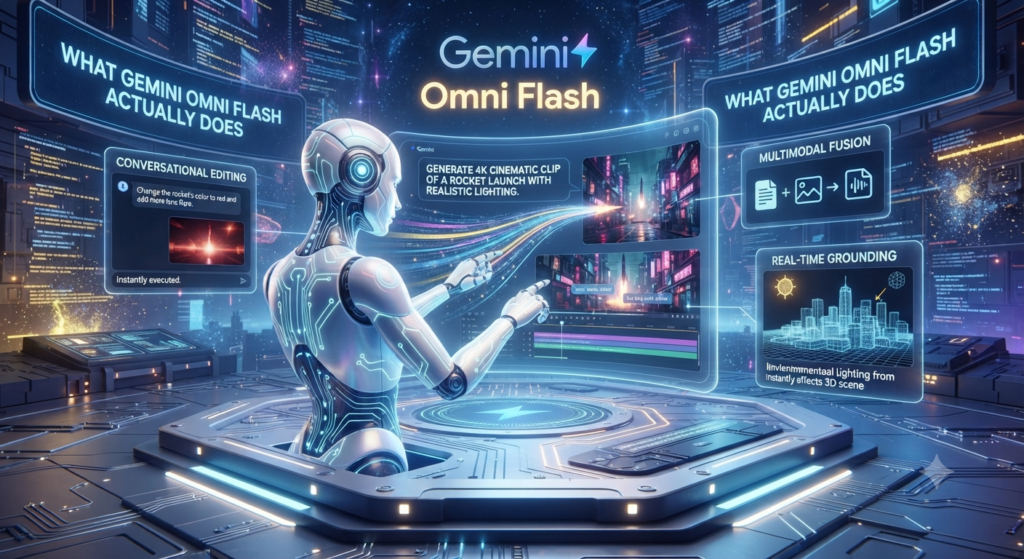
Google’s calling out four things it can do — edit conversationally without any traditional software, pull in images, text, and existing video together as references for one generation, lean on Gemini’s general knowledge to keep scenes coherent, and handle both brand-new generations and edits to footage you already shot. Right now clips top out at 10 seconds, though Google’s already said longer durations are coming. It’s also still labeled a public preview, so don’t be shocked if some of this shifts before it’s fully rolled out.
Nano Banana 2 Lite Is All About Speed
Nano Banana 2 Lite (its real name is Gemini 3.1 Flash-Lite Image, if you want to get technical) is basically the replacement for the original Nano Banana, sitting one rung below the beefier Nano Banana Pro. And it’s fast — like, four-seconds-per-image fast, at $0.034 per 1,000 images. That’s not pricing built for one perfect hero shot. That’s pricing built for people who need fifty variations of something by lunch.
Which actually makes it genuinely useful for a specific kind of work: quick prototypes, testing ten ad variations against each other, mockups, storyboard frames, social posts where volume matters more than perfection. Google says it still holds its own on following instructions, keeping characters consistent, and rendering text properly, even with the smaller footprint. It’s already showing up in the regular Gemini app, Google Photos, AI Mode in Search, NotebookLM, and Google Ads, so a lot of people are going to run into this without even realizing it’s a new model.

What It Costs and Where to Find It
Neither of these is priced like a premium tool, and that’s kind of the point. Nano Banana 2 Lite runs $0.034 per 1,000 images at 1K resolution. Gemini Omni Flash costs $0.10 per second of video generated — which, worth noting, is exactly what Veo 3.1 Fast costs too. So Google’s putting this in direct competition with its own faster video model, not just with everyone else’s tools.
You can get to both right now through Google AI Studio and the Gemini API if you’re building something, or through the Gemini Enterprise Agent Platform if it’s for work. And if you’re just a regular Gemini app user, you’ll probably start seeing faster image generation show up without doing anything differently at all.
The Real Trick: Using Both Together
Here’s the part I actually find interesting. Google isn’t positioning these as two separate products you pick between — they’re meant to be chained. Generate your image with Nano Banana 2 Lite first, then feed that straight into Gemini Omni Flash to bring it to life as a short clip.
If that two-step flow sounds familiar, it’s because it’s basically the same image-to-video workflow a lot of us already use with PixVerse — draft the still, then animate it. Google’s just built the whole pipeline natively into its own stack now, instead of you needing to hop between tools. Both models also carry SynthID watermarking, which is worth knowing about as more platforms start requiring some kind of proof that content was AI-generated.
Is It Better Than PixVerse or Seedance?
Short answer: not really, and Google isn’t even trying to claim that. A 10-second cap is nowhere near Seedance 2.5’s full 30-second single-shot clips, and this clearly isn’t meant to compete with PixVerse’s V6 model on final output quality. Google’s got Veo 3.1 for that job. This pair is doing something different — it’s the fast, cheap, “let me just try five versions of this idea” layer.
And honestly, that’s where it earns its keep. If you’re already living inside Gemini or Google Workspace, having decent image and video generation right there — no new account, no new platform — removes a lot of friction for quick social posts, ad tests, or rough drafts you’re not precious about. For the final, polished piece you’re actually going to publish, PixVerse and Seedance 2.5 still do the heavier lifting. But for the “let me just see what this looks like” stage before you commit to a real render, Gemini Omni Flash and Nano Banana 2 Lite fill a gap that’s actually been missing.
Want to explore more AI creative tools? Check out our hands-on coverage of [PixVerse, our go-to AI video generator] and [Seedream 5.0‘s reasoning-based image editing] for more tools worth adding to your workflow.
For more hands-on AI tools you can start using today, check out our AI Tools section
for the latest coverage.